Your shopping cart is empty!
Tel: +1 (416)-800-8386
- Hello, Sign in

Shopping Cart - 0 item(s) - $0.00CAD
ESP8266 Weather Station Kit for Arduino
ESP8266 Weather Station Kit for Arduino
-74x74.jpg "ESP8266 Weather Station Kit for Arduino")
-74x74.jpg "ESP8266 Weather Station Kit for Arduino")
-74x74.jpg "ESP8266 Weather Station Kit for Arduino")
-500x500.jpg "ESP8266 Weather Station Kit for Arduino")
-500x500.jpg "ESP8266 Weather Station Kit for Arduino")
-500x500.jpg "ESP8266 Weather Station Kit for Arduino")
Product Code: 1044
Availability: Out Of Stock
Availability: Out Of Stock
$33.99CAD
The weather station uses the ESP8266-12E to obtain data from the
Internet: time of a city, weather data and forecast information for the
next 3 days, scrolling on the SSD1306 OLED Display; the device can
switch to display data from any city in the world.
Guidance Step:
Package Included:
The device uses sensors DHT11,
BMP180 and BH1750FVI to collect temperature, humidity, atmospheric pressure
and light data. The weather station reads data indoor via sensor every 5
seconds and uploads it to the Internet every 60 seconds. You can see
real-time data charts from your phone or computer. Of course you can
modify the code to implement different functions.
ESP8266: CP2102 chip inside, Micro USB, 4MB flash, full I/O port and wireless 802.11 supported with IOT platform.
DHT11
Sensor: A digital signal output with a calibrated temperature and
humidity combined sensor. The simple communication protocol greatly
reduces the programming effort required.
BMP180: High-precision, small size, ultra-low power 3μA pressure sensor. Its
performance excellence, the absolute accuracy of the lowest can reach
0.03hPa. can directly through the I2C bus connected with a variety of
microprocessors, pressure range: 300 ~ 1100hPa.
BH1750FVI: Digital Light intensity Sensor. Direct digital output, complex calculation is omitted, omitting calibration.
OLED Yellow Blue Display: 0.96" SSD1306 128x64 Yellow and Blue OLED LCD Display with I2C IIC SPI Serial.
Result:
1. Get weather data from OpenWeathermap at regular intervals,
showing the weather of today and weather forecast for next 3 days in any
city in the world.
2. Read the current temperature, humidity data indoor at regular intervals.
3. Regular reading of atmospheric pressure, light intensity data.
4. Upload temperature, humidity, atmospheric pressure and intensity of illumination data to thingspeak.com at regular intervals.
5. View weather forecast on OLED display and view environmental monitoring chart on thingspeak.com.
Guidance Step:
Overview: This manual describes how to make a miniature weather station by IDE
Step 1: Install USB-To-Serial
Step 2: Install IDE for ESP8266
Step 3: Burning Firmware to ESP8266
Step 4: Connecting Components
Step 5: Register OpenWeathermap, thingspeak new account
Step 6: Import WeatherStation code in the IDE
Step 7: Add Library
Step 8: Modify File WeatherStation.ino
Step 9: Set the Board and Port again
Step 10: Burn code to ESP8266
Step 11: Result
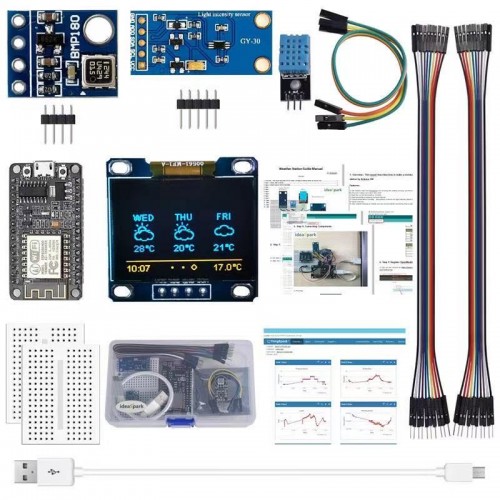
Package Included:
- ESP8266-12E x 1
- DHT11 x 1
- BMP180 x 1
- BH1750FVI x 1
- 0.96" OLED Display x 1
- USB Cable x 1
- Mini Breadboard x 2
- Male to Female Jumper Wire x 20
Documents:
About Us
X2 Robotics is a supplier of electronic parts and components in Canada. We carry a large selection of open source electronics such as Adafruit, Arduino, Pololu, Raspberry Pi, SparkFun and more. We ship orders to anywhere in Canada or the United States.
Information
Customer Service
My Account
Our Address
X2 ROBOTICS
P.O. Box 37052
RPO Centerpoint
North York, Ontario
Canada M2M 4J8


X2 Robotics © 2026. All Rights Reserved.